What can you do in the cloud?
Development/Operations (DevOps) Topics
#The while loop in Python uses a counter variable as a #condition.  The counter is incremented by 1 at the end of #each iteration of the loop and the condition (counter < 5) #is checked at the beginning of each iteration of the loop.
#The while loop will keep looping as long as the condition #(counter < 5) is True.

counter = 0             # <---initialize counter variable
while counter < 5:      # <---check condition if True
    print (counter)
    counter += 1        # <---increment counter by 1

#define a list named "numbers" with 7 values
numbers = [34.6, -203.4, 44.9, 68.3, -12.2, 44.6, 12.7]

#create a newlist using list comprehensions:
newlist = [int(x) for x in numbers if x > 0]

#printing newlist will only have positive numbers
print(newlist)
#define the Vehicle class
class Vehicle:
    name = ""
    kind = "car"
    color = ""
    value = 100.00

    #class function named description
    #we define a variable named desc_str and use
    #string formatting inside the string
    def description(self):
        desc_str = "%s is a %s %s worth $%.2f."
        % (self.name, self.color, self.kind, self.value)
        return desc_str

#instantiate two objects of the Vehicle Class
car1 = Vehicle()
car2 = Vehicle()

#Modify variables for car1 object inherited from the Vehicle Class

car1.name = "Fer"
car1.kind = "convertible"
car1.color = "red"
car1.value = float(60000.00)

#Modify variables for car2 object inherited from the Vehicle Class

car2.name = "Jump"
car2.kind = "van"
car2.color = "blue"
car2.value = float(10000.00)

print(car1.description())
print(car2.description())
#Conditions
x = 2
print(x==2) #prints out True
print(x==3) #prints out False
print(x<3) #prints out True

#Using "and" + "or" keywords
name = "John"
age = 23
if name == "John" and age == 23:
    print("Your name is John, and you are also 23 years old.")

if name == "John" or name == "Rick":
    print("Your name is either John or Rick.")

#Using "in" keyword
name = "John"
if name in ["John", "Rick"]:
    print("Your name is either John or Rick.")

#Using the "is" keyword.  "is" compares instances vs "==" which compares values

x = [1,2,3]
y = [1,2,3]
print(x == y) #Prints out True
print(x is y) #Prints out False

#using the "not" keyword
second_number = not 10
print(second_number) #Prints False
print(not second_number) #Prints True
#Basic_String_Operations
# <<---this is a comment

#can use double or single quotes"
astring = "Hello world!"
astring2 = 'Hello world!'

#enclose single quotes inside double quotes
print("single quotes are ' '")

#print the length of a string
print(len(astring))

#print index of string w/ first occurrence of the letter #"o"
print(astring.index("o"))

#count the number of "ls" in a string
print(astring.count("l"))

#output slice of string from index 3 to 6 (
always one less from end number specified)
print(astring[3:7])

#print slice of string from index 3 to 6 w/ step of 1
print(astring[3:7:1])

#reverse a string
print(astring[::-1])

#convert string to all uppercase characters
print(astring.upper())

#convert string to all lowercase characters
print(astring.lower())

print(astring.startswith("Hello"))  #returns true if #true
print(astring.endswith("blah")) #returns false

#create a list with words of the string separated by a #space
afewwords = astring.split(" ")
data = ("John", "Doe", 53.44)
format_string = "Hello %s %s. Your current balance is $%s."
print(format_string % data)
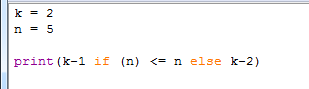
The print() statement in Python 3 allows you to specify the result of an if-else statement before the test condition syntax. The example code below has an output of 1.
 Tim's DevOps Blog